
01
See what a tenant owes
- Open Tenants. Total arrears adds up every unpaid month across your tenants, with this month's part shown underneath.
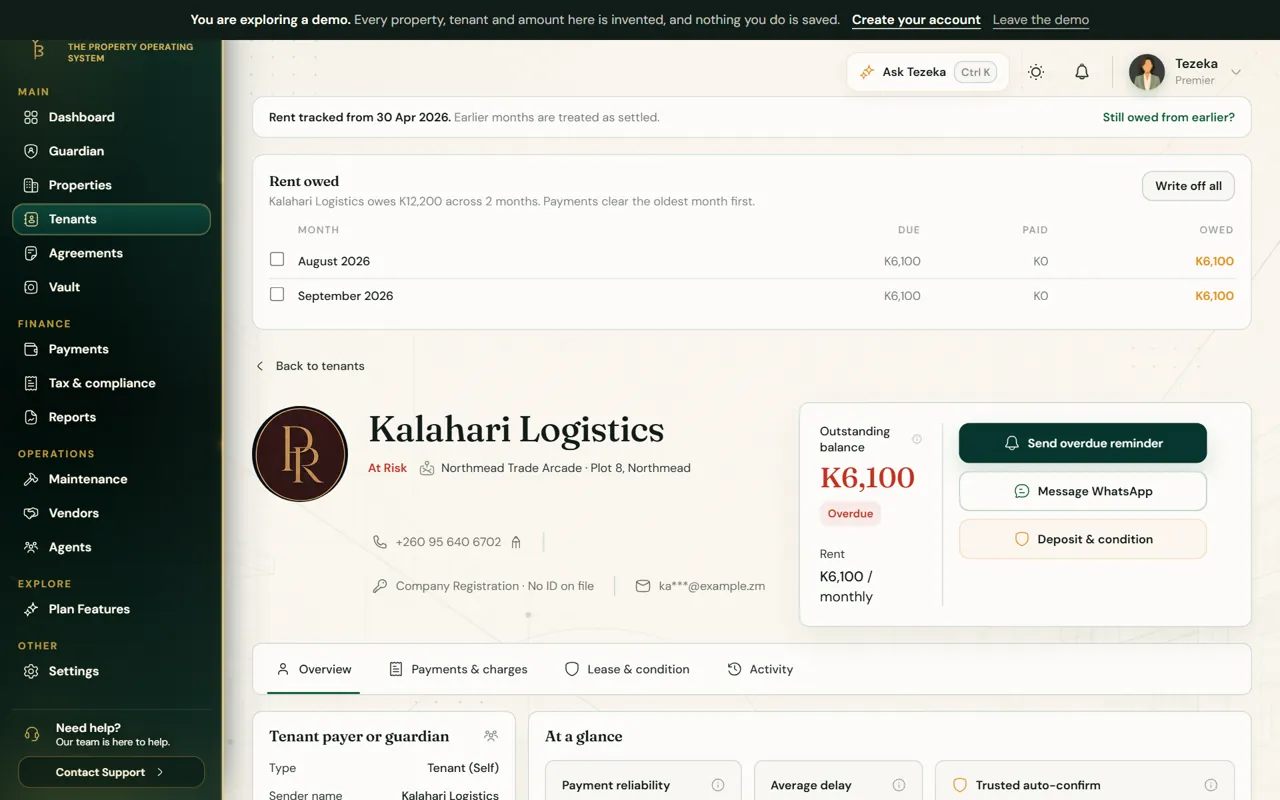
- Open a tenant. Rent owed lists each unpaid month with what was due, what was paid and what is still owed.
02
They still owe from before
- On the tenant's page choose Still owed from earlier?.
- Pick the first unpaid month. Tezeka adds every month from there to the tenant's balance.
- Payments they make from now on clear those months first, oldest first.
03
Write off a debt
- On the tenant's page, tick the months to write off, or choose Write off all.
- Give a reason. It is kept with the record.
- The months drop out of arrears. Changed your mind? Undo it from the same list.
- On WhatsApp, send write off and the tenant's name, then reply YES to confirm.
NoteA write-off changes what Tezeka says is owed. It does not tell the tenant anything, and it does not change any payment that was made.
If something goes wrong
Arrears on the Reports page differ from the Tenants page.
The Reports page shows the last six months of unpaid rent and charges; the Tenants page shows every unpaid month. Both use the same rules for move-in dates and write-offs.
A written-off month came back.
It was undone, or a new rent amount was set for that month. Open the tenant to see the month's history.
Still stuck? Contact support.