
Before you start
- The move-in report, if you made one
- Photos of the unit as they leave
- Any repair quotes for damage
01
Record the move-out
- Open the tenant and choose Tenant moved out.
- Confirm with Record move-out. The unit is released and rent reminders stop. Payments, documents and history stay as they are.
- Tezeka takes you straight to settling the deposit.
02
Walk the move-out checklist
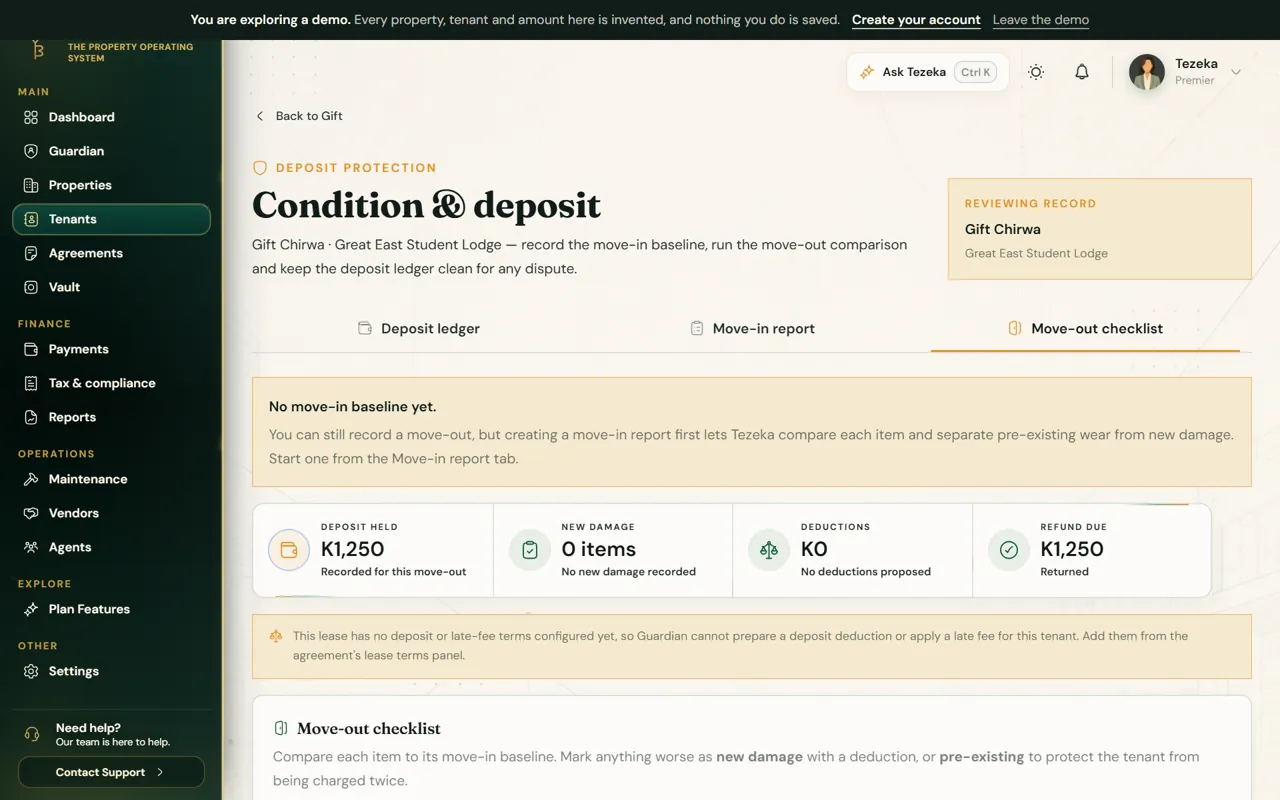
- On Condition & deposit, open Move-out checklist.
- Go room by room. Mark each item as it is now, and whether any damage is new or was there at move-in.
- Add photos for anything you intend to charge for. A deduction without evidence is hard to defend.
- Only new damage can become a deduction; wear that was recorded at move-in cannot.
03
Settle the deposit
- Review the deductions and the refund due at the top of the page.
- Save once, then download the Refund statement PDF. It lists the deposit, each deduction and its reason, and the amount refunded.
- Send the refund the way you normally pay, then record it on Deposit ledger so the deposit shows as settled.
NoteSettle quickly. A deposit left unsettled after a tenant leaves is the most common cause of disputes.
If something goes wrong
There is no move-in report to compare with.
You can still record a move-out, but Tezeka cannot show what is new damage. Keep your photos and describe each item carefully.
The refund statement button is greyed out.
Save the checklist once. The statement is generated from the saved record.
Still stuck? Contact support.