
01
How the figures are worked out
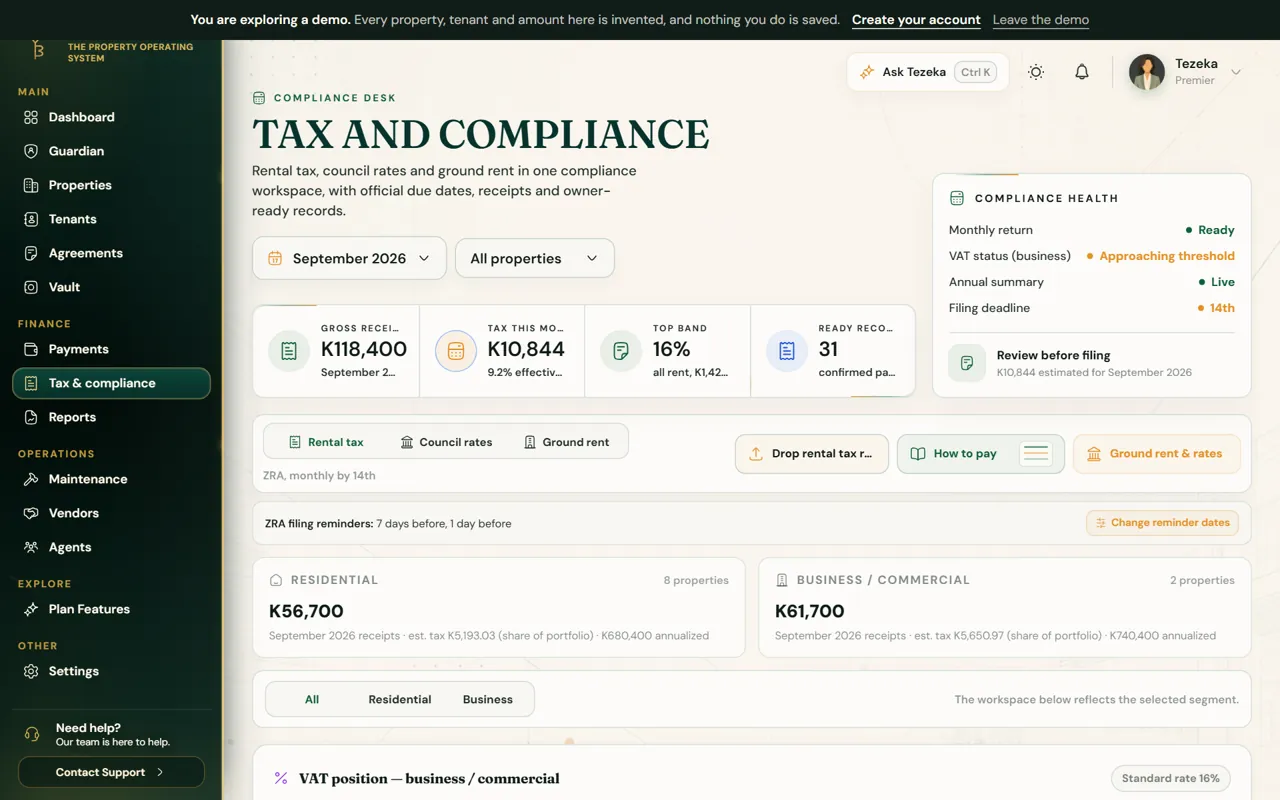
Tax is charged on gross rent received, so Tezeka works from confirmed payments in each month. Repairs and running costs do not reduce it, which is why they are shown beside the income rather than subtracted from it.
Tezeka applies the rental income tax bands (0%, 4% and 16%) and splits residential from business rent, using how each property is let.
02
Each month
- Confirm the month's payments first. Unconfirmed payments are left out.
- Open Tax & compliance and pick the month.
- Read the gross receipts and the tax for the month. For a PDF of the figures, download the ZRA monthly rental tax report from Reports.
- File and pay with ZRA by the 14th, yourself or through your accountant.
NoteTezeka prepares the figures; it does not file for you and is not a tax adviser. Check anything unusual with ZRA or your accountant before you file.
03
Reminders, council rates and ground rent
- Tezeka reminds you before each monthly return. Choose Change reminder dates to pick how many days before.
- Council rates and ground rent reminders are off until you turn them on. Switch them on in the same place if you want them.
04
The annual tax summary
On Pro and above, Tax & compliance also carries an Annual tax summary: your annualised rental turnover, which band it falls in, and the same figures gathered for a full year rather than one month.
If something goes wrong
The tax figure is lower than I expected.
Only confirmed rent counts. Check Payments for anything still waiting for review in that month.
A property is counted as business rent.
Open the property and change how it is let under tax and ownership.
Still stuck? Contact support.