
01
The value receipt
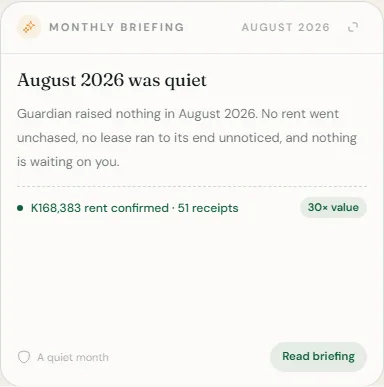
On Overview, the Monthly briefing card carries a receipt for the month: rent confirmed and how many payments, late rent brought in for earlier months, receipts issued, reminders actually sent, not attempted, repairs closed, leases signed, and a conservative estimate of the admin time Guardian handled.
Every line is a count or a sum of your own confirmed records for that month. Where Tezeka did not do something, a reminder that failed to send, for instance, it is left out rather than claimed.
Where your plan cost and confirmed rent both allow it, the receipt adds one sentence: how many kwacha of rent your plan looked after for every kwacha it cost. Tezeka verifies and records this money; it never collects or holds it.
02
The written account, Pro and above
- Open the Monthly briefing card and choose the expand control to read the full briefing.
- It opens with a headline and what happened in plain paragraphs, then Needs you, anything waiting on a decision, then the value receipt, then Watch next for what the coming month turns on.
- The same narrative is delivered on WhatsApp; opening it here reads back whatever was sent, so joining late or skimming the message on your phone never loses it.
NoteA quiet month with nothing to flag is reported as exactly that, a real result, not a broken card.
If something goes wrong
My briefing only shows the receipt, no narrative.
The written account needs Pro. The receipt itself, what was actually done, stays visible on every plan below it.
There is no briefing at all yet.
Your first briefing appears once there is a full month of activity to report on.
Still stuck? Contact support.