
Before you start
- Their full name, ID number and phone number
- The rent, how often it is due and the first due date
- For a tenant already living there: from which month you want Tezeka to track rent
01
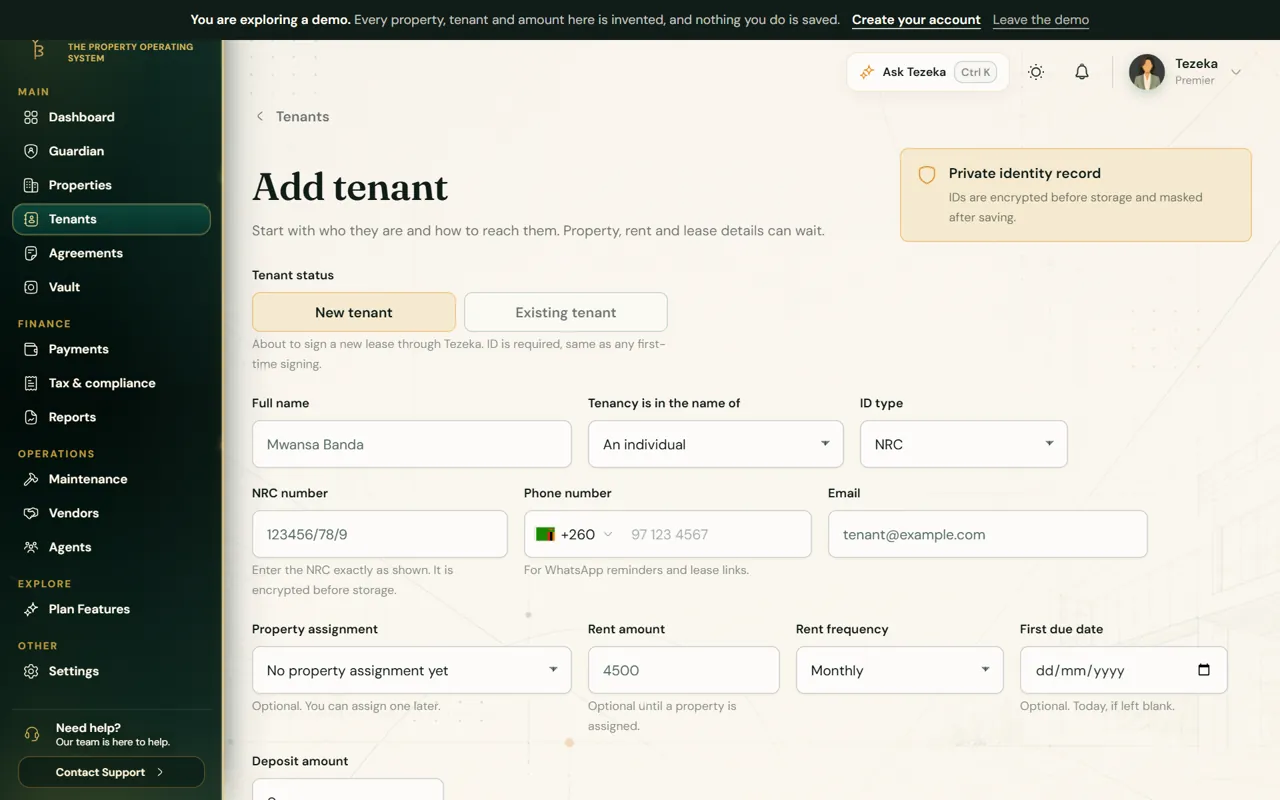
New or existing tenant
- Open Tenants and choose Add Tenant.
- Pick New tenant if they are about to sign a lease through Tezeka, or Existing tenant if they already rent from you.
- Fill in Full name, say whether the tenancy is in the name of a person or an organisation, then the ID type and number. Tezeka encrypts the ID number before it is stored and masks it once saved.
- Add the phone number. Rent reminders and receipts go to it on WhatsApp.
02
Rent, frequency and the first due date
- Enter Rent amount and Rent frequency (monthly, every two months, quarterly and so on).
- Set First due date. Tezeka works out every later due date from it, so it matters more than any other field.
- Assign the property and unit now or later. Rent is only tracked once the tenant is on a property.
03
When rent tracking starts
For a tenant who was already living there before you joined Tezeka, you choose where their balance starts.
Tezeka tracks rent from the date you choose. Months before it are treated as settled, so a tenant who has paid you for years in cash does not appear to owe you all of it.
If they do still owe you from before, open the tenant and choose Still owed from earlier?, then pick the first month that is unpaid. Those months become part of their balance.
NoteStarting from the current month is the safe choice. You can move the start back later; nothing is lost.
If something goes wrong
A new tenant shows arrears from before they moved in.
Check the move-in date and First due date on their record. Rent is only owed from the first due date on or after the day tracking starts.
The tenant is not getting WhatsApp reminders.
Reminders go to the phone number on the record, on WhatsApp only. Check the number, including the country code.
Still stuck? Contact support.